What is Form ST3?
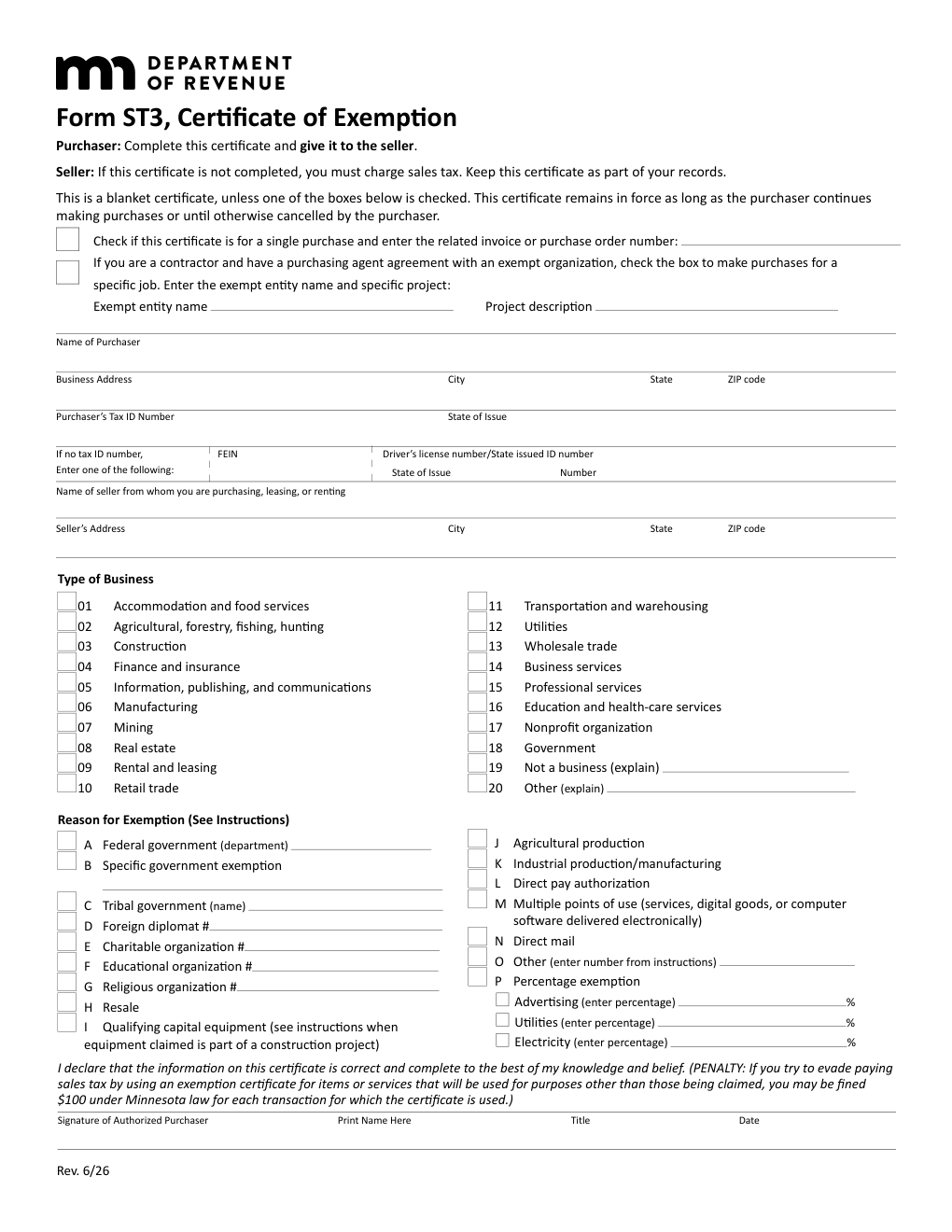
Quick answer: Form ST3 is the Minnesota Certificate of Exemption. A purchaser completes it and gives it to the seller, who keeps it in their records; it is not sent to the Minnesota Department of Revenue. The certificate is a blanket certificate unless a single-purchase box is checked, and stays in force while the purchaser continues making purchases or until cancelled. The seller must charge sales tax if the certificate is not completed. The form covers resale, qualifying capital equipment, agricultural and industrial production, government, tax-exempt organizations and other reasons.
ST3 is Minnesota’s general exemption and resale certificate. The same form is used for resale purchases, for exempt organizations such as charities, schools and churches (which need exempt status authorization from the Department for some reasons), and for production and capital equipment exemptions.
The purchaser is responsible for knowing whether they qualify to claim an exemption; a seller who accepts a completed certificate is relieved from collecting sales tax.
Key Figures — Form ST3 (Rev. 6/26)
- Who completes it: the purchaser; the seller keeps it. Do not send it to the Department of Revenue.
- Blanket certificate: in force while the purchaser keeps buying from the seller, unless the single-purchase box is checked (enter the invoice or purchase order number) or the purchaser cancels it.
- Seller’s duty: if the certificate is incomplete, the seller must charge sales tax.
- Reasons for exemption (A–P): federal government, specific government exemption, tribal government, foreign diplomat, charitable, educational and religious organizations, resale (H), qualifying capital equipment (I), agricultural production (J), industrial production/manufacturing (K), direct pay authorization (L), multiple points of use (M), direct mail (N), other (O), percentage exemption (P).
- Contractors: a contractor with a purchasing agent agreement with an exempt organization checks the box for a specific job and enters the exempt entity name and project.
- Penalty warning: the form warns against using an exemption certificate to evade sales tax on items used for other purposes.
Source: the Minnesota Department of Revenue, Form ST3 (Rev. 6/26) and its instructions. Last verified October 14, 2026.
Who Must File Form ST3?
Purchasers who buy items that are exempt from Minnesota sales tax, for resale or another qualifying reason, complete the certificate and give it to the seller. Include your Minnesota tax ID number if you have one; if not, enter an FEIN or a driver’s license or state ID number as the form instructs.
Sellers keep the certificate as part of their records and may be required to provide it to verify an exempt sale. Accepting a completed certificate relieves you from collecting tax.
Exempt organizations claiming charitable, educational or religious status enter the exempt status number; some reasons require authorization from the Department.
Qualifying capital equipment claimed as part of a construction project follows special instructions on the form.
Common trap: sending the certificate to the Department of Revenue. The purchaser gives it to the seller; the Department does not want it.
How to File Form ST3
- Enter the purchaser’s name, address and tax ID number, and the seller’s name and address.
- Choose blanket or single purchase, and for a contractor with a purchasing agent agreement, the specific job.
- Select the type of business (accommodation and food services, construction, manufacturing, retail trade and so on).
- Check the reason for exemption (A through P) and, for a percentage exemption, enter the percentage for advertising, utilities or electricity.
- Sign and date as an authorized purchaser, with printed name and title.
- Give it to the seller, who keeps it with their records.
When Is Form ST3 Due?
There is no filing date: a purchaser gives the certificate to the seller at or before the time of purchase. A blanket certificate remains in force as long as the purchaser continues making purchases from the seller or until cancelled. A single-purchase certificate applies only to the invoice or purchase order number entered on the form.
How to Complete Form ST3 Line by Line
Purchaser and Seller Information
Enter the purchaser’s name, business address, tax ID number (and state of issue), or, if there is none, the FEIN or a driver’s license or state ID number with its state of issue. Enter the seller’s name and address. A contractor with a purchasing agent agreement checks the box and names the exempt entity and project.
Type of Business
Choose one of the listed business types: accommodation and food services; agricultural, forestry, fishing and hunting; construction; finance and insurance; information, publishing and communications; manufacturing; mining; real estate; rental and leasing; retail trade; transportation and warehousing; utilities; wholesale trade; business services; professional services; education and health-care services; nonprofit organization; government; not a business (explain); or other (explain).
Reason for Exemption (A–P)
Check the reason that applies:
| Line | What to enter |
|---|---|
| A | Federal government. |
| B | Specific government exemption. |
| C | Tribal government. |
| D | Foreign diplomat. |
| E | Charitable organization. |
| F | Educational organization. |
| G | Religious organization. |
| H | Resale. |
| I | Qualifying capital equipment. |
| J | Agricultural production. |
| K | Industrial production/manufacturing. |
| L | Direct pay authorization. |
| M | Multiple points of use (services, digital goods or software delivered electronically). |
| N | Direct mail. |
| O | Other (enter the number from the instructions). |
| P | Percentage exemption. |
Organizations in categories D, E, F and G enter their exempt number.
Declaration and Signature
The purchaser declares that the information is correct and complete. The form warns that trying to evade sales tax by using an exemption certificate for items or services that will be used for other purposes is penalized. The authorized purchaser signs, prints a name and title and dates the certificate.
Common Mistakes to Avoid
- Mailing it to the Department. Give it to the seller.
- Leaving the form incomplete. The seller must then charge sales tax.
- Choosing the wrong exemption reason. The purchaser is responsible for knowing if the exemption applies.
- Using a blanket certificate for a single job. Check the single-purchase box and enter the invoice or purchase order number when that is the intent.
- Forgetting the exempt number. Charitable, educational and religious organizations enter their exempt status number.
- Using the certificate for personal purchases. The form warns against that.
Frequently Asked Questions
Who gets Form ST3? The seller. The purchaser completes it and gives it to the seller, who keeps it.
Do I send it to the Department of Revenue? No.
Is it good for more than one purchase? Yes, it is a blanket certificate unless the single-purchase box is checked.
What if the seller gets an incomplete certificate? The seller must charge sales tax.
Can I use it for resale? Yes, check reason H (resale).
Does it work for exempt organizations? Yes, with the appropriate exemption reason and exempt number; some reasons need authorization from the Department.
Final Review Before Filing
- The purchaser and seller details are complete and the tax ID number is entered.
- Blanket or single purchase is selected correctly.
- The business type and the reason for exemption are checked.
- The exempt number is entered when the reason requires it.
- The certificate is signed, dated and given to the seller.
- You are confident the purchase qualifies for the exemption.
Sources & verification
- Issuing agency: Minnesota Department of Revenue
- Official documents: Form ST3 (PDF)
- Checked against: Form ST3, Certificate of Exemption (Rev. 6/26)
- Last verified: October 14, 2026
Spot an error or an out-of-date figure? Tell us and we will check it against the official source.
General information from the official form and its instructions, not advice for your circumstances. See the full disclaimer.