What is Form REV-1705R?
Quick answer: Form REV-1705R is how a Pennsylvania business updates the details of its existing tax accounts — a corrected federal Entity ID, a new legal or trade name, changed primary, location, or mailing addresses, a switch to a more frequent filing schedule, or registration to collect local sales tax in Allegheny or Philadelphia county. It does not open or close accounts and cannot be used for an ownership change or reorganization, which require a new registration. There is no calendar deadline — you submit it when the information changes — and it is sent by fax or email, or the same updates can be made online through myPATH. Below, the REV-1705R instructions are explained field by field, in plain language.
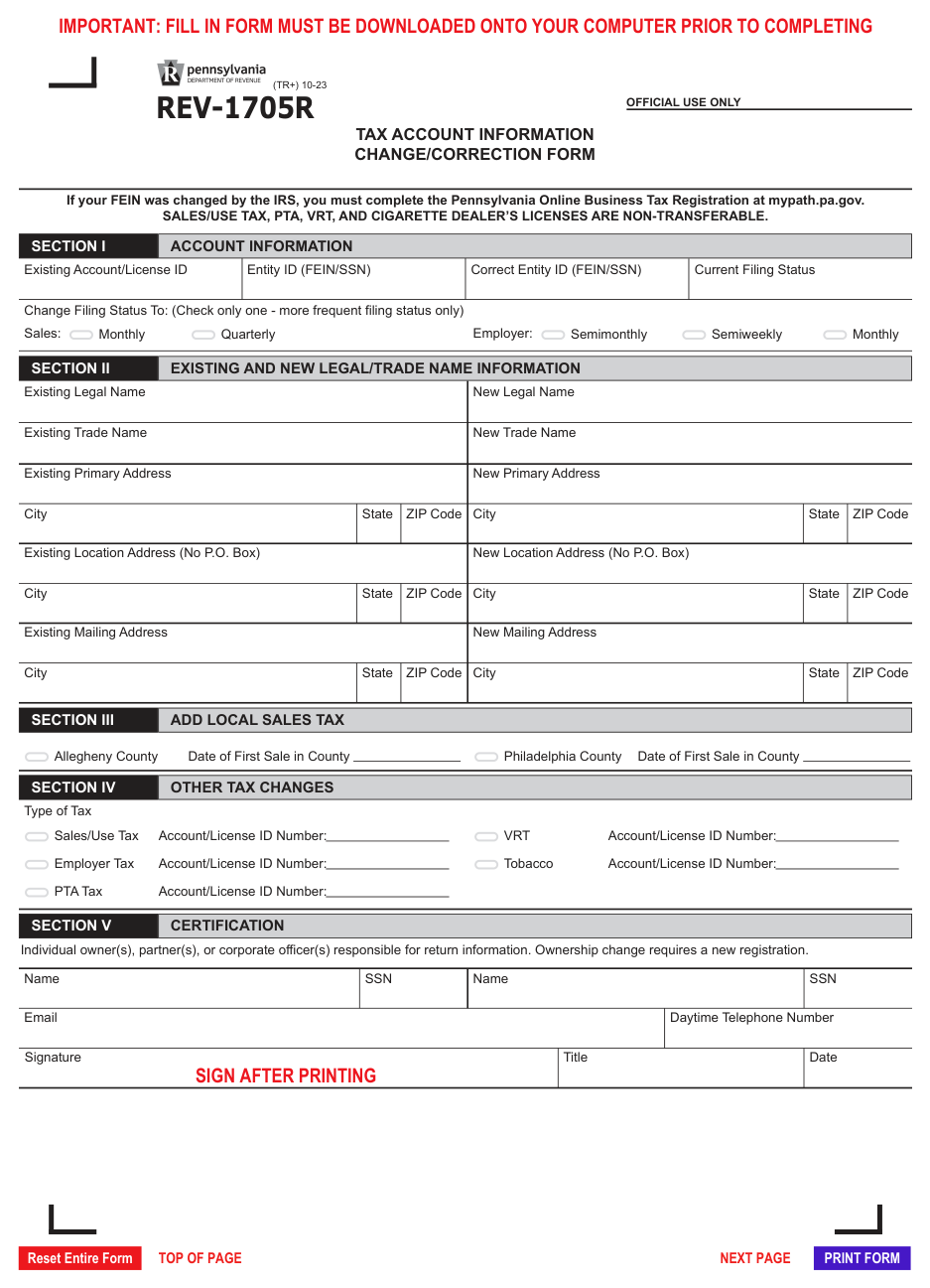
Form REV-1705R, the Tax Account Information Change/Correction Form, keeps the Department of Revenue’s record of your business accurate after something changes. It handles corrections to your federal Entity ID, changes to your legal or trade name, updates to your addresses, a move to a more frequent filing schedule, and registration to collect the local sales tax that applies in Allegheny and Philadelphia counties.
The form pairs each existing value with its new value and is signed by an owner, partner, or corporate officer responsible for the account. Completing it matters because stale account information causes real problems: notices and refunds sent to an old address, filing reminders on the wrong schedule, and — if you open a location in Allegheny or Philadelphia without registering — uncollected local sales tax that you still owe.
Key Figures — Form REV-1705R (revision TR+ 10-23)
- Use it for: corrected Entity ID (FEIN/SSN); legal or trade name change (not from reorganization); primary, location, or mailing address change; change to a more frequent filing status only; adding Allegheny or Philadelphia local sales tax; and information changes for other listed business taxes.
- A filing-status change takes effect only at the start of a filing period.
- A physical location address cannot be a P.O. Box.
- Sales/use tax, PTA, vehicle rental, and cigarette dealer’s licenses are non-transferable.
- A new FEIN from the IRS, a change of ownership, or a business reorganization requires a new Pennsylvania Online Business Tax Registration, not this form.
- Submit by fax to 717-787-3708 or email to ra-btftregisfax@pa.gov.
- Online alternative: make the changes at mypath.pa.gov.
- Source: Pennsylvania Department of Revenue — Form REV-1705R (revision TR+ 10-23).
- Last verified: 2026-09-08
Who Must Complete Pennsylvania Form REV-1705R?
Any business with existing Pennsylvania tax accounts that needs to update them, including:
Businesses whose name changed. A legal or trade name change that is not the result of incorporation or a change of ownership is reported here.
Businesses that moved or changed contact addresses. A new primary, physical location, or mailing address is updated here. A location address must be a street address, not a P.O. Box.
Businesses that need to file more often. A business that must move to a more frequent sales tax or employer withholding schedule reports the change here; the Department does not use this form to move you to a less frequent schedule.
Businesses expanding into Allegheny or Philadelphia county. A business that opens a location there and does not already report that county’s local sales tax registers for it in Section III.
Businesses correcting an Entity ID. A business whose FEIN or SSN on file is wrong corrects it here — but a genuinely new FEIN issued by the IRS instead requires a new registration.
Who should not use this form. A business closing an account uses Form REV-1706. A business that changed ownership, incorporated, or otherwise reorganized, or that received a new FEIN, must complete a new Pennsylvania Online Business Tax Registration.
How to File Pennsylvania Form REV-1705R
- Online: Log in to myPATH at mypath.pa.gov and update the account details directly. This is the fastest route and confirms the change immediately.
- By fax or email: Complete the form, sign Section V, and send it to the Bureau of Business Trust Fund Taxes at the fax number or email address in the instructions.
- Keep filing on your current schedule until a filing-status change takes effect at the start of the next filing period.
Before you start, gather: your eleven-digit Account ID, eight-digit License ID, or eight-digit Withholding ID for each account affected; the exact old and new values for whatever is changing; and, for a local sales tax registration, the date of your first taxable sale in Allegheny or Philadelphia county.
When to Submit Pennsylvania Form REV-1705R
There is no fixed deadline; submit the form when the information changes.
- As soon as the change occurs — a corrected Entity ID, a new name, a new address, or the need to file more frequently.
- Before or as of your first taxable sale in Allegheny or Philadelphia county, so you are registered to collect that county’s local sales tax from the start.
- A filing-status change takes effect at the beginning of a filing period, not on the date you submit the form, so send it in before the period you want it to apply to.
- If you delay, Department notices and any refunds continue going to the old address, filing reminders stay on the old schedule, and unregistered local sales tax in Allegheny or Philadelphia remains your liability even though you did not collect it.
Where to Send Pennsylvania Form REV-1705R
You do not mail this form to a PO box. Send the completed, signed form to the Department’s business tax registration unit:
- Fax: 717-787-3708
- Email: ra-btftregisfax@pa.gov
- Online alternative: Make the same changes by logging in to myPATH at mypath.pa.gov.
- Attachments: None are required, but keep documentation of the change (amended formation documents, a lease, IRS correspondence about an Entity ID) with your records.
How to Complete Pennsylvania Form REV-1705R Section by Section
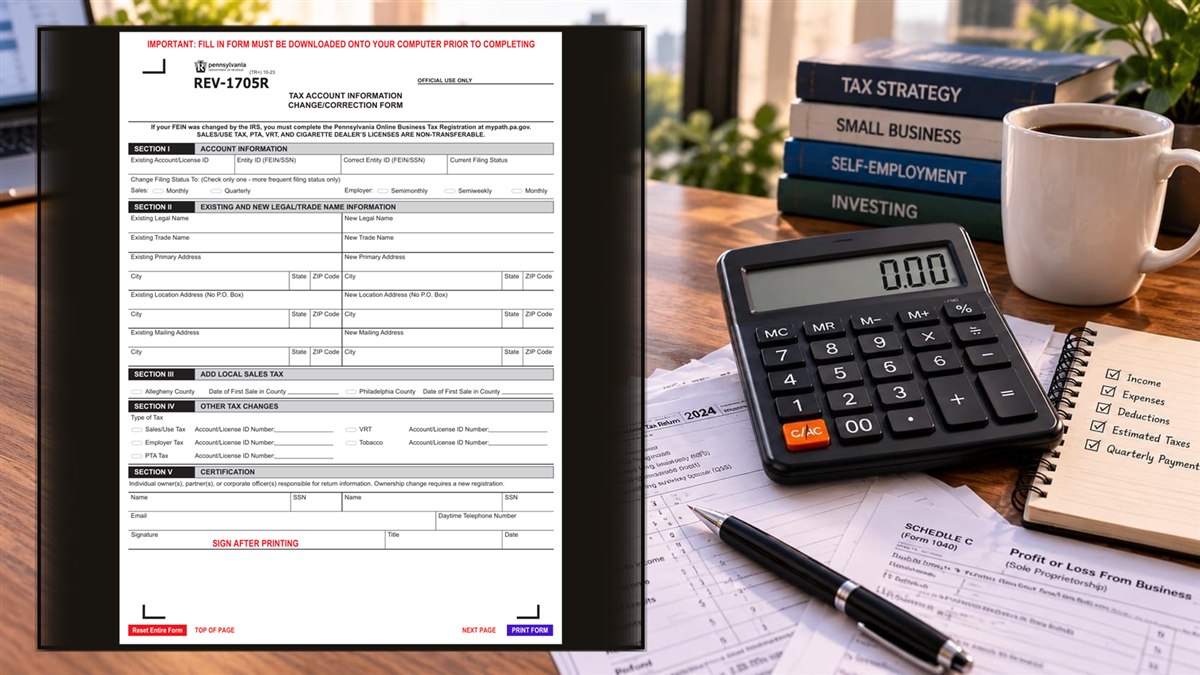
The REV-1705R instructions divide the form into numbered sections; complete only the ones tied to the change you are reporting.
Section I — Account Information
Existing Account/License ID: Enter your eleven-digit Account ID, eight-digit License ID, or eight-digit Withholding ID Number.
Entity ID (FEIN/SSN): Enter the federal Entity ID currently on file.
Correct Entity ID (FEIN/SSN): Enter the correct Entity ID if the one on file is wrong. Leave blank if it is correct. A new FEIN issued by the IRS is not a correction — it requires a new registration.
Current Filing Status: Enter your current filing frequency for the account.
Change Filing Status To: Check only one box, and only for a more frequent schedule (the form does not move you to a less frequent one). The sales tax options on the form are semimonthly, monthly, and semiweekly; the employer withholding options are the more frequent withholding schedules. The change is effective only at the start of a filing period.
Section II — Existing and New Legal/Trade Name and Address Information
Existing Legal Name / New Legal Name: Enter the current legal name and the new legal name. A name change caused by incorporation or a change of ownership requires a new registration instead.
Existing Trade Name / New Trade Name: Enter the current and new trade name (DBA).
Existing Primary Address / New Primary Address: Enter the current and new primary address with city, state, and ZIP.
Existing Location Address / New Location Address: Enter the current and new physical location address with city, state, and ZIP. A P.O. Box is not acceptable for a location address.
Existing Mailing Address / New Mailing Address: Enter the current and new mailing address with city, state, and ZIP.
Section III — Add Local Sales Tax
Allegheny County — Date of First Sale in County: If you are opening a location in Allegheny County and do not already report its local sales tax, check the county and enter the date of your first sale there.
Philadelphia County — Date of First Sale in County: If you are opening a location in Philadelphia County and do not already report its local sales tax, check the county and enter the date of your first sale there.
Section IV — Other Tax Changes
Type of Tax and Account/License ID Number: For each additional tax account affected by the change, check the box — Sales/Use Tax, Employer Tax, PTA Tax, VRT, or Tobacco — and enter that account or license ID so the Department applies the change to every relevant account.
Section V — Certification
Name and SSN: Enter the name and Social Security number of each individual owner, partner, or corporate officer responsible for return information. A change to the responsible individuals is reported here; a change of ownership itself requires a new registration.
Email and Daytime Telephone Number: Enter contact details for the Department to follow up.
Signature, Title, Date: An owner, partner, or corporate officer signs, enters their title, and dates the form. Sign after printing.
Common Mistakes to Avoid
- Using this form after a reorganization or ownership change. Incorporation, a new owner, or a new FEIN requires a new Pennsylvania Online Business Tax Registration, not a change form.
- Trying to move to a less frequent schedule. The filing-status change on this form is for a more frequent schedule only.
- Expecting a filing-status change to start immediately. It takes effect at the beginning of the next filing period.
- Entering a P.O. Box as a location address. A physical location address must be a street address.
- Opening in Allegheny or Philadelphia without registering. Local sales tax you failed to collect there is still your liability.
- Updating one account and forgetting the others. Use Section IV to apply the change to every affected account.
- Leaving Section V unsigned. An unsigned form is not processed.
- Confusing this form with REV-1706. REV-1705R changes account details; REV-1706 closes accounts.
Frequently Asked Questions
Do I file REV-1705R every year? No. You file it only when account information changes.
Can I change my address online instead? Yes. myPATH at mypath.pa.gov lets you update addresses, names, and filing frequency directly.
Where do I send the paper form? By fax to 717-787-3708 or email to ra-btftregisfax@pa.gov.
I incorporated my sole proprietorship. Can I just change the name here? No. Incorporation is a reorganization and requires a new business tax registration to get new account IDs.
When does a switch to monthly filing take effect? At the start of a filing period, not on the date you submit the form.
Can I use this form to file less often? No. It only moves you to a more frequent schedule.
My FEIN on file has a typo. Is that a correction or a new registration? Correcting a data-entry error is a correction you can make here. A genuinely new FEIN from the IRS requires a new registration.
I opened a store in Philadelphia. What do I do? Complete Section III with the date of your first sale there so you are registered to collect Philadelphia local sales tax.
Final Review Before Filing
- Every affected account or license ID is entered.
- Each change shows both the existing value and the new value.
- Any filing-status change is to a more frequent schedule and only one box is checked.
- Location addresses are street addresses, not P.O. Boxes.
- Section III has a first-sale date for any new Allegheny or Philadelphia location.
- Section IV lists every other tax account the change applies to.
- Section V is signed by an owner, partner, or officer, with title and date, after printing.
- The change is not actually a reorganization or ownership change (which needs a new registration).
- Sent by fax to 717-787-3708 or email to ra-btftregisfax@pa.gov, or completed on myPATH.
- You kept a copy and documentation of the change.
Sources & verification
- Issuing agency: Pennsylvania Department of Revenue
- Official documents: Form REV-1705R (PDF)
- Checked against: REV-1705R (TR+) 10-23
- Last verified: September 8, 2026
Spot an error or an out-of-date figure? Tell us and we will check it against the official source.
General information from the official form and its instructions, not advice for your circumstances. See the full disclaimer.