

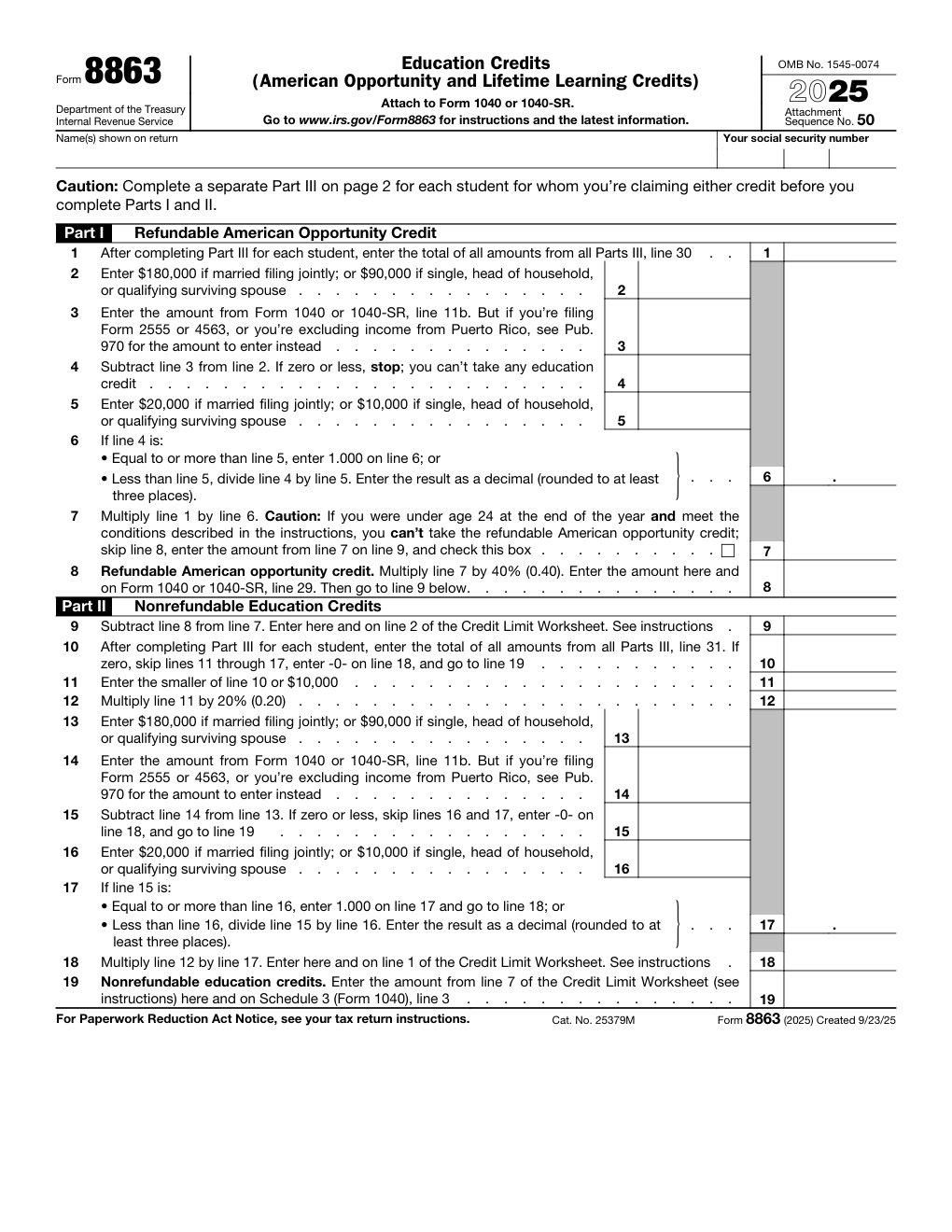
What is Form 8863?
Quick answer: IRS Form 8863 is the form you attach to your Form 1040 or 1040-SR to claim an education credit: the American opportunity credit (up to $2,500 per student, partly refundable) or the lifetime learning credit (up to $2,000 per return). You fill in Part III for each student first, then Parts I and II, and the result flows to your return.
Form 8863 does two jobs. It figures the American opportunity credit, which is worth more and can pay out as a refund, and the lifetime learning credit, which only reduces the tax you owe. You can claim both on the same return, but never both for the same student in the same year.
The form is organized backwards from how you work it. Page 2 (Part III) is filled in once for each student; its totals feed Part I (the American opportunity credit) and Part II (the lifetime learning credit) on page 1. This guide follows the version of the form posted for tax year 2025. Dollar limits are set by law and the IRS republishes the form each year, so check the IRS page before you file.
Key Figures — Form 8863 (2025) and its instructions
- American opportunity credit: up to $2,500 per eligible student, which is 100% of the first $2,000 and 25% of the next $2,000 of adjusted qualified education expenses. Up to 40% of it can be refundable.
- Lifetime learning credit: 20% of up to $10,000 of adjusted qualified education expenses, so the maximum is $2,000 per return. It is not refundable.
- Income limit (MAGI): phased out between $80,000 and $90,000, or $160,000 and $180,000 if married filing jointly; no credit at $90,000 or more ($180,000 or more).
- American opportunity credit rules: available for only 4 tax years per student, the student must be enrolled at least half-time in a degree or credential program, and you must enter the school’s EIN.
- Form 1098-T: the law generally requires a Form 1098-T from the eligible educational institution before you can claim either credit.
- Where it goes: the refundable credit to Form 1040 line 29, the nonrefundable credit to Schedule 3, line 3.
Source: the IRS, Form 8863 and the Instructions for Form 8863. Last verified October 27, 2026.
Who Must File Form 8863?
Anyone who paid qualified education expenses for themselves, a spouse or a dependent at an eligible postsecondary school and wants to claim an education credit on Form 1040 or 1040-SR.
The person who claims the student as a dependent is the only one who can claim the credit for that student. If nobody claims the student as a dependent, the student claims it.
Who cannot claim a credit: someone claimed as a dependent on another return, anyone whose filing status is married filing separately, a nonresident alien who did not elect to be treated as a resident alien, anyone whose MAGI is at or above the limit, and a student who was not issued a taxpayer identification number by the return’s due date (including extensions).
Common trap: using the amount in box 1 of Form 1098-T as if it were your expenses. Use only what you actually paid, reduced by tax-free scholarships and other tax-free assistance.
How to File Form 8863
- Gather Form 1098-T from each school, receipts for tuition and required course materials, and the school’s EIN.
- Work out adjusted qualified education expenses for each student: what was paid, minus tax-free scholarships, grants and other tax-free assistance.
- Decide which credit fits each student. The American opportunity credit is always the larger one when a student qualifies for both.
- Complete Part III (page 2) for each student, then Part I and Part II on page 1.
- Finish the Credit Limit Worksheet in the instructions, then enter the results on Schedule 3, line 3 (nonrefundable) and Form 1040 line 29 (refundable).
- Attach Form 8863 to your Form 1040 or 1040-SR, and e-file or mail it with the return.
When Is Form 8863 Due?
There is no separate due date. Form 8863 is filed with your Form 1040 or 1040-SR and is due when the return is due, including any extension. Expenses count for the year you paid them, and tuition paid in the tax year for an academic period that begins in the first three months of the next year can be used for the credit in the year you paid it.
Where to Mail Form 8863
Do not mail Form 8863 on its own. File it as an attachment to Form 1040 or 1040-SR, electronically with your tax software or by mail following the instructions for your return.
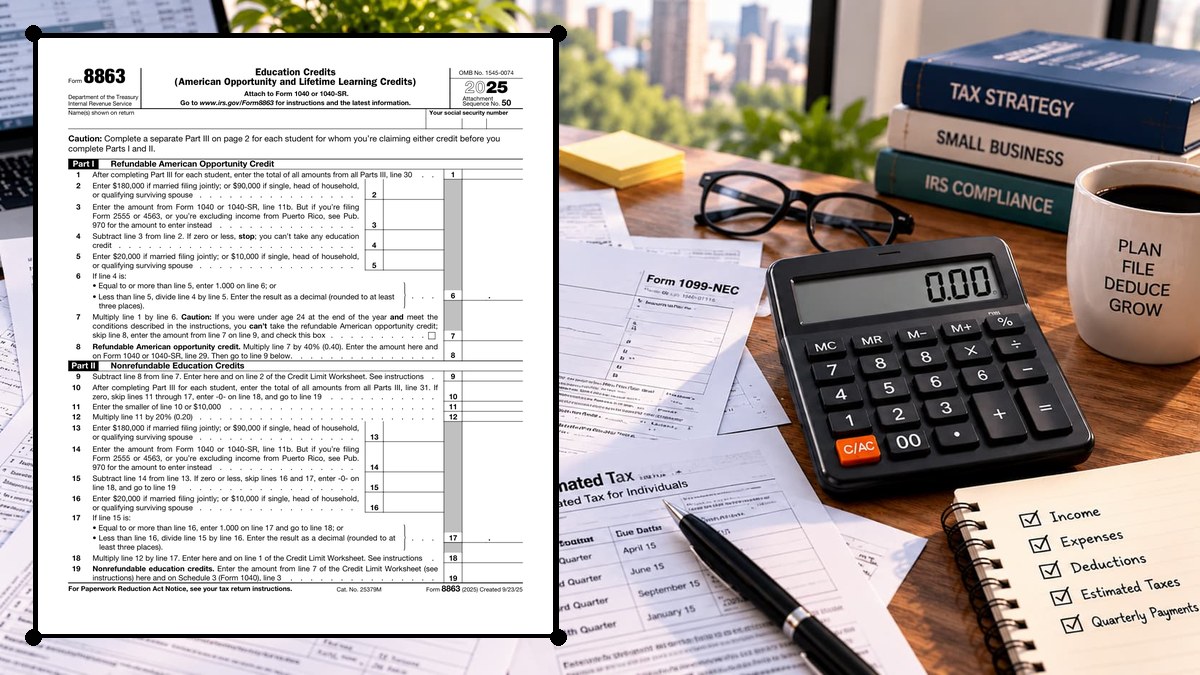
How to Complete Form 8863 Line by Line
Part I — Refundable American Opportunity Credit (Lines 1–8)
Complete Part III for every student first. Then use the totals here.
| Line | What to enter |
|---|---|
| Line 1 | The total of the refundable-credit amounts from Part III, line 30, for every student you claim the American opportunity credit for. Fill in Part III for each student first. |
| Line 2 | Enter $180,000 if you are married filing jointly, or $90,000 if you are single, head of household or a qualifying surviving spouse. |
| Line 3 | Your modified adjusted gross income (MAGI): the amount on Form 1040 or 1040-SR, line 11b. If you file Form 2555 or 4563, or exclude income from Puerto Rico, add the excluded income as Publication 970 explains. |
| Line 4 | Line 2 minus line 3. If the result is zero or less, stop: you cannot take any education credit. |
| Line 5 | Enter $20,000 if married filing jointly, or $10,000 for every other eligible filing status. |
| Line 6 | If line 4 is equal to or more than line 5, enter 1.000. If it is less, divide line 4 by line 5 and round to at least three decimal places. This is the phase-out share you keep. |
| Line 7 | Line 1 times line 6. If you were under 24 at the end of the year and meet the conditions in the instructions, you cannot take the refundable part: check the box, skip line 8 and enter line 7 on line 9. |
| Line 8 | Refundable American opportunity credit: line 7 times 40% (0.40). It goes here and on Form 1040 or 1040-SR, line 29. |
The refundable part is the one that can increase your refund even if you owe no tax.
Part II — Nonrefundable Education Credits (Lines 9–19)
This part carries the leftover American opportunity credit and figures the lifetime learning credit.
| Line | What to enter |
|---|---|
| Line 9 | Line 7 minus line 8. This is the nonrefundable part of the American opportunity credit and goes to line 2 of the Credit Limit Worksheet in the instructions. |
| Line 10 | The total of Part III, line 31, for every student you claim the lifetime learning credit for. If it is zero, skip lines 11 to 17, enter -0- on line 18 and go to line 19. |
| Line 11 | The smaller of line 10 or $10,000. |
| Line 12 | Line 11 times 20% (0.20). |
| Line 13 | $180,000 if married filing jointly, or $90,000 for single, head of household and qualifying surviving spouse. |
| Line 14 | Your MAGI again: Form 1040 or 1040-SR, line 11b (with the same adjustments as line 3). |
| Line 15 | Line 13 minus line 14. If zero or less, skip lines 16 and 17, enter -0- on line 18 and go to line 19. |
| Line 16 | $20,000 if married filing jointly, or $10,000 for every other eligible filing status. |
| Line 17 | If line 15 is equal to or more than line 16, enter 1.000. If it is less, divide line 15 by line 16 and round to at least three decimal places. |
| Line 18 | Line 12 times line 17. It goes to line 1 of the Credit Limit Worksheet. |
| Line 19 | Nonrefundable education credits: line 7 of the Credit Limit Worksheet, entered here and on Schedule 3 (Form 1040), line 3. |
Part III — Student and Educational Institution (Lines 20–26)
Use one copy of page 2 for each student. The questions screen out students who are not eligible for the American opportunity credit.
| Line | What to enter |
|---|---|
| Line 20 | The student’s name, as shown on page 1 of your tax return. |
| Line 21 | The student’s social security number, as shown on page 1 of your tax return. |
| Line 22 | Information about the educational institution: name, address, whether the student received Form 1098-T from it for the year and for the prior year (with box 7 checked), and the institution’s employer identification number (EIN). The EIN is required if you claim the American opportunity credit, or if you answer “Yes” to either 1098-T question. |
| Line 23 | Has the American opportunity credit been claimed for this student for any 4 prior tax years? If “Yes”, stop and go to line 31 for this student. |
| Line 24 | Was the student enrolled at least half-time for at least one academic period that began (or is treated as having begun) in the tax year, in a program leading toward a degree, certificate or other recognized credential? If “No”, stop and go to line 31. |
| Line 25 | Did the student complete the first 4 years of postsecondary education before the tax year? If “Yes”, stop and go to line 31. |
| Line 26 | Was the student convicted, before the end of the tax year, of a felony for possession or distribution of a controlled substance? If “Yes”, stop and go to line 31. If “No”, complete lines 27 to 30. |
Part III — Credit Amounts (Lines 27–31)
Choose one credit for each student. You cannot take both for the same student in the same year.
| Line | What to enter |
|---|---|
| Line 27 | American opportunity credit: adjusted qualified education expenses for this student, not more than $4,000. |
| Line 28 | Line 27 minus $2,000. If zero or less, enter -0-. |
| Line 29 | Line 28 times 25% (0.25). |
| Line 30 | If line 28 is zero, enter the amount from line 27. Otherwise add $2,000 to line 29. Skip line 31. The total of all students’ line 30 amounts goes to Part I, line 1. |
| Line 31 | Lifetime learning credit: adjusted qualified education expenses for this student. Do not complete line 31 for a student you complete lines 27 to 30 for. The total of all students’ line 31 amounts goes to Part II, line 10. |
American Opportunity vs. Lifetime Learning Credit
The instructions compare the two credits side by side. These are the points that usually decide which one you use.
| Item | What to enter |
|---|---|
| American opportunity credit | Up to $2,500 per eligible student; 100% of the first $2,000 and 25% of the next $2,000 of expenses; 40% can be refundable; available for 4 tax years per student; the student must be pursuing a degree or other recognized credential and be enrolled at least half-time. |
| Lifetime learning credit | Up to $2,000 per return; 20% of up to $10,000 of expenses; nonrefundable; no limit on the number of years; any postsecondary course, including courses to acquire or improve job skills; no degree requirement. |
| Income limit (both) | The credit phases out with MAGI between $80,000 and $90,000 ($160,000 and $180,000 if married filing jointly) and is not available at $90,000 or more ($180,000 or more if married filing jointly). |
Worked Example — American Opportunity Credit
A single filer has MAGI well below the $80,000 phase-out start and one eligible student with $4,000 of adjusted qualified education expenses. Line 27 is $4,000. Line 28 is $2,000 ($4,000 − $2,000). Line 29 is $500 ($2,000 × 25%). Line 30 is $2,500 ($2,000 + $500). With no phase-out, line 6 is 1.000, so line 7 is $2,500 and the refundable credit on line 8 is $1,000 ($2,500 × 40%). The remaining $1,500 goes to line 9 and is limited by the Credit Limit Worksheet. (An illustration of the arithmetic on the form; your credit depends on your own facts.)
Common Mistakes to Avoid
- Claiming both credits for the same student. Pick one for each student for the year.
- Counting personal costs. Room and board, insurance, medical expenses (including student health fees) and transportation are never qualified expenses.
- Forgetting the school’s EIN. It is required for the American opportunity credit.
- Filing separately. Married filing separately cannot claim either credit.
- Counting the same expenses twice. Expenses used for another education benefit, such as a tax-free 529 distribution or a deduction, cannot also support the credit.
- Skipping Form 8862 after a denial. If an American opportunity credit was denied or reduced for a reason other than a math or clerical error, you may have to attach Form 8862 the next time you claim it.
Frequently Asked Questions
What is the difference between the two education credits? The American opportunity credit is worth up to $2,500 per student, can be partly refundable, and is limited to four years. The lifetime learning credit is worth up to $2,000 per return, is nonrefundable and has no year limit.
Can I claim an education credit without Form 1098-T? The law generally requires it. The instructions describe exceptions, such as a student whose school is not required to send one, and the steps to take if the school should have sent one but did not.
What counts as a qualified education expense? Tuition and required fees. For the American opportunity credit, course materials such as books, supplies and equipment also count. For the lifetime learning credit, they count only if they must be paid to the school as a condition of enrollment.
Where does the credit go on my return? The nonrefundable credit goes to Schedule 3, line 3, and the refundable American opportunity credit to Form 1040 or 1040-SR, line 29.
Can a dependent student claim the credit? No. If the student is claimed as a dependent, only the person who claims the student can take the credit, and the student’s expenses are treated as paid by that person.
Is there a separate deadline? No. Form 8863 is filed with your return and is due when the return is due, including extensions.
Final Review Before Filing
- You have a Form 1098-T for each student, or the instructions’ exception applies.
- Each student has a taxpayer identification number issued by the return’s due date.
- Expenses are reduced by tax-free scholarships and assistance, and personal costs are left out.
- Part III is complete for every student and each student has only one credit.
- The school’s EIN is entered for any American opportunity credit.
- Form 8863 is attached to Form 1040 or 1040-SR, with the credit entered on Schedule 3, line 3 and, if refundable, on line 29.
Sources & verification
- Issuing agency: Internal Revenue Service
- Official documents: Form 8863 (PDF) · Instructions for Form 8863 (PDF) · IRS Form 8863 page
- Checked against: Form 8863 (2025) and the Instructions for Form 8863 (2025) from the Internal Revenue Service
- Last verified: October 27, 2026
Spot an error or an out-of-date figure? Tell us and we will check it against the official source.
General information from the official form and its instructions, not advice for your circumstances. See the full disclaimer.